How Does AI Merch Actually Work? A Process Walkthrough
Custyle Lab
Research & Guides · Oct 28, 2026·12 min read
How Does AI Merch Actually Work? A Process Walkthrough
TL;DR: How does AI merch work? In seven stages. A language model reads what you mean. An image model builds the artwork out of random noise. The system then fixes four things a screen image gets wrong for print: pixels, color, background and technique. It picks the right product and method, shows you a preview, and sends one unit to a factory. Most providers make it in 2–5 business days, then ship it.
You type one sentence. A week later, a real shirt lands at your door. Between those two moments sit seven distinct jobs. Most people only ever see the first one.
This walkthrough is for anyone curious about what happens behind the chat box. That includes creators planning a drop, people sending a gift, and anyone who has watched a great AI image print badly. It skips the hype and shows the mechanics, with numbers at every stage.
For the big-picture concept, start with → Related: Prompt to Product. This piece goes one level deeper.
Contents
- The seven stages at a glance
- Stage 1: Reading what you mean
- Stage 2: How the picture gets made
- Stage 3: Why a picture isn't a print file
- Stage 4: Picking product and technique
- Stage 5: The preview
- Stage 6: Production and shipping
- Stage 7: What it costs
- Who owns an AI design?
- Where AI merch still breaks
- How Custyle runs the chain
- FAQ
The Seven Stages at a Glance
AI merch is not one model doing one trick. It is a relay. Each stage hands a cleaner, more specific object to the next.
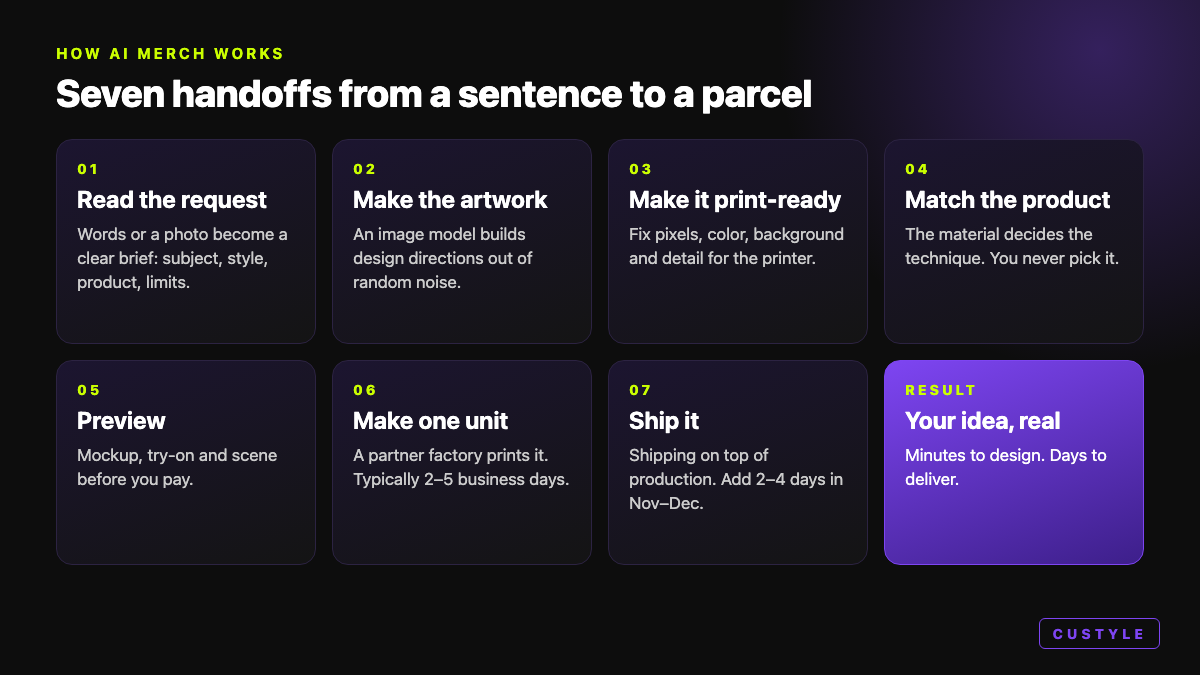 From a sentence to a parcel: seven handoffs, each one narrowing the idea into something a factory can make.
| Stage | What goes in | What comes out |
|---|---|---|
| 1. Read the request | Your words or photo | A clear brief: subject, style, product, limits |
| 2. Make the artwork | The brief | Several design directions |
| 3. Make it print-ready | A screen image | A file sized, colored and cut for print |
| 4. Match product + method | The print file | The right product and technique |
| 5. Preview | Design + product | Mockups, try-on, scenes |
| 6. Produce + ship | Your order | One unit, made and shipped |
| 7. Price it | Product + method | What you pay |
AI merch works as a relay of specialist steps — language understanding, image generation, print preparation, product matching, preview, and on-demand production — not as a single image generator.
Stage 1: Reading What You Mean
Every request starts vague. "Something minimalist for my brother who climbs." That sentence hides a subject, a style, a recipient and a taste.
A language model parses it first. It pulls out the subject (climbing), the style (minimalist), the person (a brother), and the hidden limits. "For a cap" quietly means few colors and bold shapes. "For a mug" means the design must wrap a curve.
This is where most of the quality is won or lost. A sharp brief beats a beautiful image of the wrong idea. Custyle splits this job across specialists. Vibbi leads the run, Pia reads your taste, and Nova sharpens the concept. The reasoning behind that split lives in → Related: Why Custyle Built a 9-Agent Crew.
Stage 2: How the Picture Gets Made
Most image models today are diffusion models. The way they work sounds backwards.
- Start from noise. Generation begins with pure random static, per the KDnuggets explainer.
- Turn words into numbers. A text encoder converts your brief into an embedding, a numeric map of meaning.
- Remove noise, step by step. A trained network strips away a little static at each step. The embedding steers every step toward your idea.
- Shape first, detail last. A 2024 NeurIPS paper found the process sets overall shape early and adds fine detail later.
One setting matters a lot. "Guidance" controls how hard the model follows your words. Push it high and you get a closer match, but less variety and more artifacts.
Text is the classic weak spot. Older models turned letters into lookalike glyphs. Text rendering improved sharply through 2025 and 2026, with models such as Ideogram 3.0 built for it, per MindStudio. But non-Latin scripts like Arabic, Chinese and Hebrew still fail far more often. Always read the words on your design.
Stage 3: Why a Picture Isn't a Print File
This is the stage nobody talks about. It's also why so many AI designs look great on screen and bad on a shirt.
A screen image and a print file are different objects: the print file must have enough pixels for the physical size, colors the ink can reach, a clean transparent background, and detail suited to the technique.
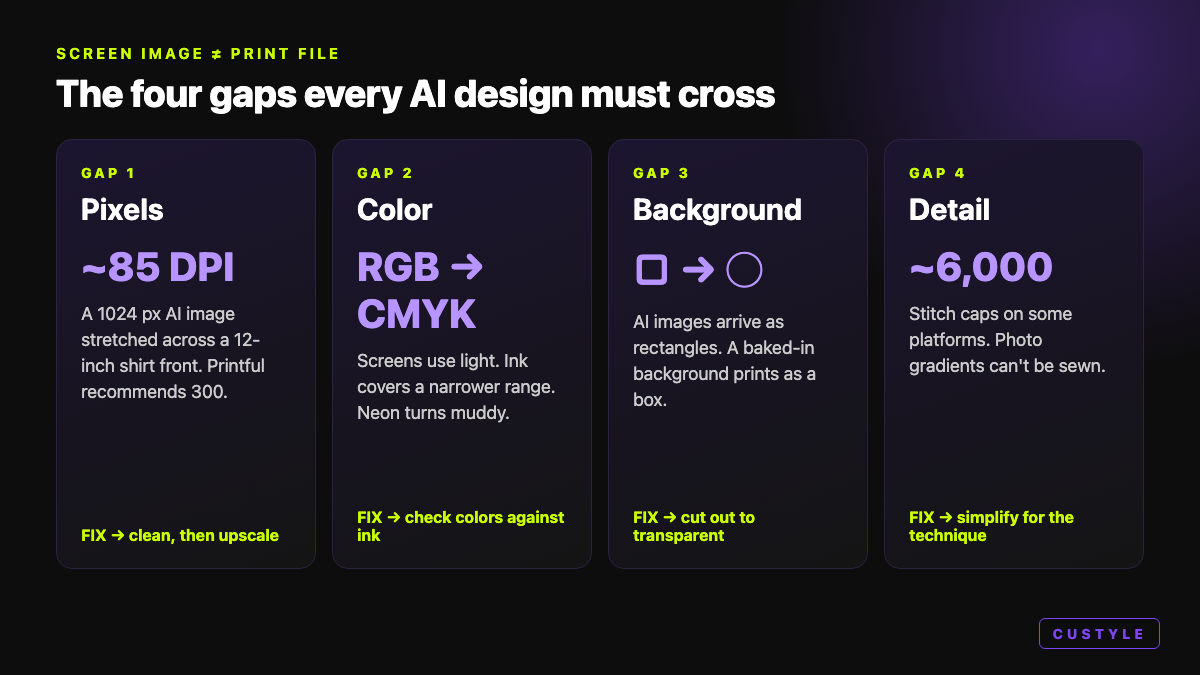 The four gaps every AI design must cross before it reaches a printer.
Gap 1: Pixels
Print size times DPI (dots per inch) gives the pixels you need. Printful recommends 300 DPI for most files. Large-format products can drop to 120–150 DPI.
| Print size | At 300 DPI | At 150 DPI |
|---|---|---|
| 12 × 16 in shirt front | 3600 × 4800 px | 1800 × 2400 px |
| 4 × 4 in chest logo | 1200 × 1200 px | 600 × 600 px |
| 13.3 × 13.3 in square | 4000 × 4000 px | 2000 × 2000 px |
Now do the math on a typical 1024 × 1024 AI image. Stretched to 12 inches wide, it lands near 85 DPI. That's soft, blocky and visibly pixelated.
This isn't rare. Printful reported that "a lot" of orders couldn't be fulfilled because files missed its print requirements. Its built-in upscaler, which doubles DPI for files in the 38–74 DPI range, helped more than 9,000 customers get those orders made.
Upscaling helps, but it can't invent real detail. Upscale a damaged image and you enlarge the damage too. Clean first, then upscale.
Gap 2: Color
Screens make color with light (RGB). Printers make it with ink (CMYK). Ink covers a narrower range.
Printful says plainly that neon and deeply saturated shades exist on screen, but its printers work in a "neon-less" CMYK space. Out-of-range colors get swapped for the nearest match, which often looks muddy, per its color matching guide. True neon needs special inks that standard garment printing doesn't use.
Gap 3: Background
AI images arrive as rectangles. On a shirt, that baked-in background prints as a visible box. The design has to be cut out onto a transparent background first.
Gap 4: Detail vs Technique
A photo-real portrait can't be stitched. Embroidery needs the art traced into vector shapes, then "digitized" into stitch paths. Stitch count drives cost, and some platforms cap it near 6,000 stitches. Fine gradients have to become bold, flat shapes.
Stage 4: Picking Product and Technique
The material decides the method. You never have to pick it, but here's what happens under the hood.
| Technique | Best on | Watch out for |
|---|---|---|
| Direct-to-garment (DTG) | 100% cotton tees | Weaker on polyester |
| Direct-to-film (DTF) | Cotton, poly, blends, darks | Slightly smoother, film-like feel |
| Sublimation | White polyester, coated mugs | No cotton, no dark fabric |
| Embroidery | Caps, polos, jackets | No gradients or tiny detail |
| UV print / engraving | Phone cases, metal, wood | Surface-specific |
Sources: Shopify, Printful, Snappy.
Placement matters as much as method. Every product has its own print area. A centered chest graphic and an all-over print that must survive seams are two different compositions.
Good systems run this logic backwards from your idea. They ask which form carries the vibe best, not which blank is cheapest. Then the file gets rebuilt for that exact technique. → Related: Inside Bolt, the Production Brain
Stage 5: The Preview
Before anything is made, you see the design on the product. That usually means three views:
- Mockup: the design rendered on the right product template.
- Try-on: how it looks on a real body.
- Scene: how it lives in the world, on a desk or at a show.
A mockup is a promise about what the printer will do. So an honest mockup respects the technique. An embroidered cap mockup should never show a photo gradient the needle can't sew.
Stage 6: Production and Shipping
You approve. The order and its print file go to a production partner, usually by API. Nothing exists until this moment. That's the on-demand model underneath almost all AI merch.
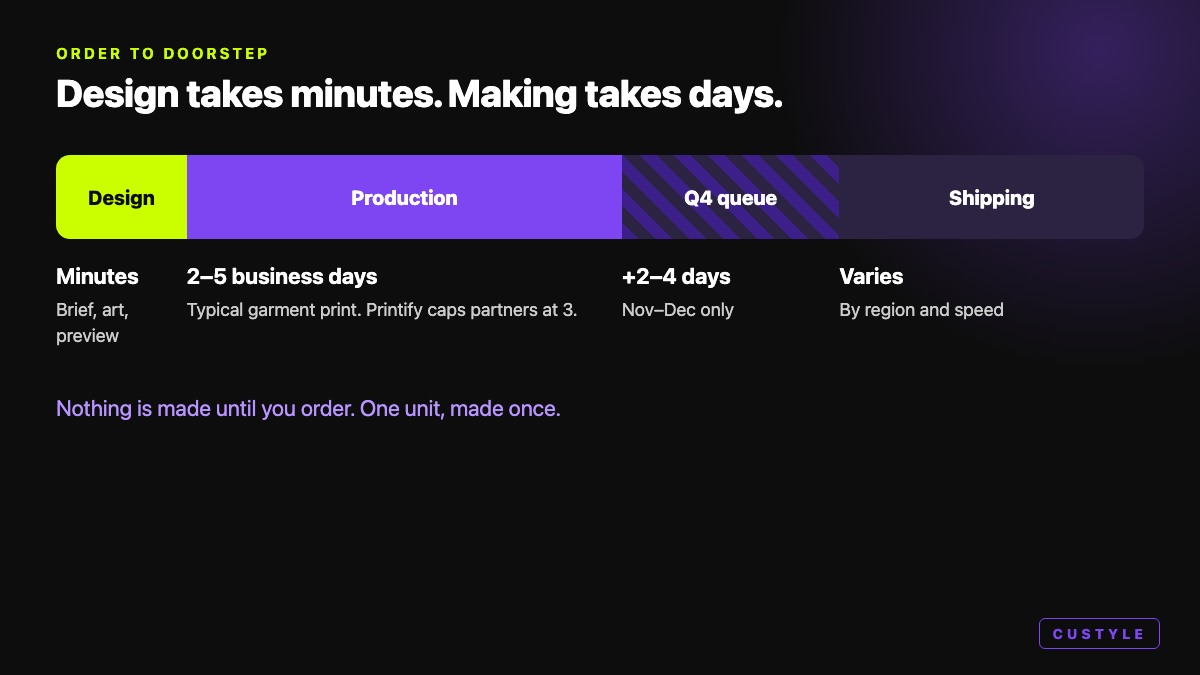 Design takes minutes. Making and shipping take days, and longer in Q4.
| Step | Typical time | Source |
|---|---|---|
| Design + preview | Minutes | — |
| Production (garment print) | 2–5 business days | Industry roundup |
| Printify partner cap | Max 3 business days | Printify SLA, Mar 2026 |
| Nov–Dec queue | Add 2–4 days | Industry roundup |
| Shipping | On top of production | Varies by region |
Misprints happen, but rarely. Reviewer data puts defect rates for major providers at roughly 0.5–5%, depending on the partner, per PODVector. No audited industry-wide number exists, so treat that as a range.
Stage 7: What It Costs
The blank product is the floor. On Printify, a Gildan 64000 tee starts at $7.95 before printing extras, per Printify's own listing. A Bella+Canvas 3001 sits near $11.40–11.92 on free plans. Shipping, print areas and plan tiers move the final number.
On top sits the design layer. That's where AI changes the math. You skip the designer's fee and the minimum order. You pay for one piece, made once.
Who Owns an AI Design?
This part surprises people. The US Copyright Office's January 2025 report says works generated entirely by AI aren't copyrightable. Typing a prompt, or picking from outputs, isn't enough on its own.
Human contribution changes that, case by case. Your own photo, your own words, real edits and creative arrangement all count. Two practical rules follow:
- Add yourself. A real photo, a line you wrote, a deliberate edit.
- Skip borrowed brands. Trademarked logos and characters stay off-limits, AI or not.
Where AI Merch Still Breaks
AI merch is good, not magic. Here is the honest list.
- Words on the design. Always proofread, especially non-Latin text.
- Neon colors. Standard garment ink can't reach them.
- Photo detail in thread. Embroidery needs bold, simple art.
- Tiny uploads. A small phone screenshot can only be stretched so far.
- Holiday queues. Q4 adds days. Order early.
- Mockup vs reality. A mockup is a render. For a 200-piece drop, order one sample first.
Quick Checklist Before You Order
- Read every word on the design, twice.
- Check bright colors against the preview, not your memory.
- Confirm the product and print area fit the idea.
- Check the delivery estimate against your date.
- Add something of your own: a photo, a phrase, an edit.
How Custyle Runs the Chain
Custyle.ai, the AI Merch Agent, runs all seven stages in one chat. You describe it or drop a photo. Nine specialist agents carry it from intent to an order-ready product.
The Product Engine handles stages 3 and 4. It picks the product form and the right technique from eight methods, from garment printing to engraving to 3D printing. Then it builds the production file with the right resolution, color space, bleed and placement. Orders route through a global production network, starting with the Printful network.
You see the mockup, the try-on and the scene before you pay. You never touch a DPI setting. That's the point: your taste goes in, and the right product comes out, made for merch. → Related: What Is an AI Merch Agent?
So, how does AI merch work? A language model reads your intent. An image model builds the art from noise. Then a production layer fixes pixels, color, background and technique. The right method gets matched, a preview proves it, and one unit is made. Each stage does a job the one before it can't.
FAQ
How does AI merch work, in simple terms?
You describe an idea or upload a photo. A language model turns it into a clear brief, and an image model generates the artwork. The system then makes that artwork print-ready, matches it to the right product and technique, and shows a preview. After you order, a partner factory makes one unit and ships it.
Can I print an AI image straight onto a T-shirt?
Usually not well. A typical 1024 × 1024 AI image prints near 85 DPI on a 12-inch shirt front, far below Printful's recommended 300 DPI. It also needs color checks for ink, a transparent background, and detail suited to the technique. Good AI merch tools handle these fixes automatically before production.
How long does AI merch take to arrive?
The design takes minutes. Production for printed garments typically takes 2–5 business days at major providers, and Printify caps its partners at 3 business days. Shipping comes on top. In November and December, add 2–4 extra days for busy production queues.
Why do colors look different on the printed product?
Screens show color with light (RGB), while printers use ink (CMYK), which covers a narrower range. Neon and very saturated shades can't be reproduced with standard garment ink. The printer swaps in the nearest available color, which can look duller. Check the preview and avoid relying on neon.
Do I own the copyright to AI-generated merch designs?
Not automatically. The US Copyright Office's January 2025 report says works generated entirely by AI aren't copyrightable, and prompts alone don't count as authorship. Adding your own photo, writing, edits or creative arrangement can create protectable human authorship, judged case by case.
What's the difference between AI merch and print on demand?
Print on demand is the manufacturing model: nothing is made until someone orders. AI merch adds the creative layer on top, turning a sentence or photo into finished, print-ready artwork matched to the right product. Most AI merch uses on-demand production underneath. → Related: AI Merch vs Print on Demand
Ready to make something?
Turn your ideas into real merch with AI. No design skills needed.
Start with a vibeCustyle Lab
Research & Guides · Oct 28, 2026·12 min read
Further Reading
Explore all →
What Is Generative Merch? Definition, Examples & How It Works
Generative merch is merchandise whose design is generated by AI from your intent, then made one at a time. The definition, three tests, real examples, and the limits.
Read more →
Inside Ink: Custyle's Lazy-Cool Artwork Maker, Explained
Ink is the AI artwork maker of the Custyle Crew. It takes the concept Nova locked and draws it: type, linework, palette, and detail made for merch, not just for screens.
Read more →
Inside Moxy & Lumi: How Custyle Stages Your Product Before You See It
Moxy and Lumi are the presentation layer of the Custyle Crew — Moxy shows how your merch lands on a real person; Lumi builds the mood, context, and atmosphere around what you made.
Read more →
Creator Merch Case Study: How to Build a Merch Line in One Afternoon
A creator merch case study you can copy: real benchmarks (0.5–2% conversion, $68 AOV), an hour-by-hour afternoon build, and a fill-in template for your first drop.
Read more →