How to Choose an AI Merch Agent: 8 Questions to Ask Before You Commit
Custyle Picks
Reviews & Comparisons · Nov 24, 2026·15 min read
TL;DR: To choose an AI merch tool, start with the job you need done. Do you need artwork, a shop listing, or a finished product delivered? Then ask seven more questions. Is the file print-ready at real size? Does the design suit how it's made? How do revisions work? What's the all-in cost, and how many business days until delivery? What happens with a misprint? Who owns the design, and where do your photos go? A tool that can't answer these clearly isn't ready for your money.
You have an idea for a shirt. Maybe it's your dog in a tiny crown. Maybe it's a logo for your run club. You search for an AI merch tool and get forty tabs. They all promise "describe it, get it."
They don't all do the same thing. Some make a picture. Some make a picture and print it. A few take the whole job, from your first message to a box on your porch.
This guide shows you how to choose an AI merch tool with eight questions, and it works for any tool. It's for creators, small brands, team organizers and anyone making a one-off gift. Every number below comes from the provider's own published pages, checked in November 2026.
Disclosure: Custyle publishes this guide, and Custyle is one of the agent-style tools discussed. Use the questions on us too.
Contents
- How to choose an AI merch tool, fast
- Three kinds of AI merch tools
- Question 1: What do you actually get?
- Question 2: Is the file print-ready?
- Question 3: Does it fit how it's made?
- Question 4: How do revisions work?
- Question 5: What does one item really cost?
- Question 6: How long until it arrives?
- Question 7: What if it arrives wrong?
- Question 8: Who owns it, and your photos?
- Red flags worth walking away from
- Run a 20-minute test first
- FAQ
How to Choose an AI Merch Tool, Fast
Match the tool to the job, then check the file, the cost, the timing and the rights. Most bad experiences come from buying the wrong kind of tool. People pay for a design app when they wanted a shirt. Or they pay for a print shop when they wanted help with the idea.
Keep one rule in mind. A great image on a screen is not a great product in your hands. The tool that wins is the one that gets you from idea to a wearable result with the fewest surprises.
Three Kinds of AI Merch Tools
"AI merch tool" covers three different jobs in 2026.
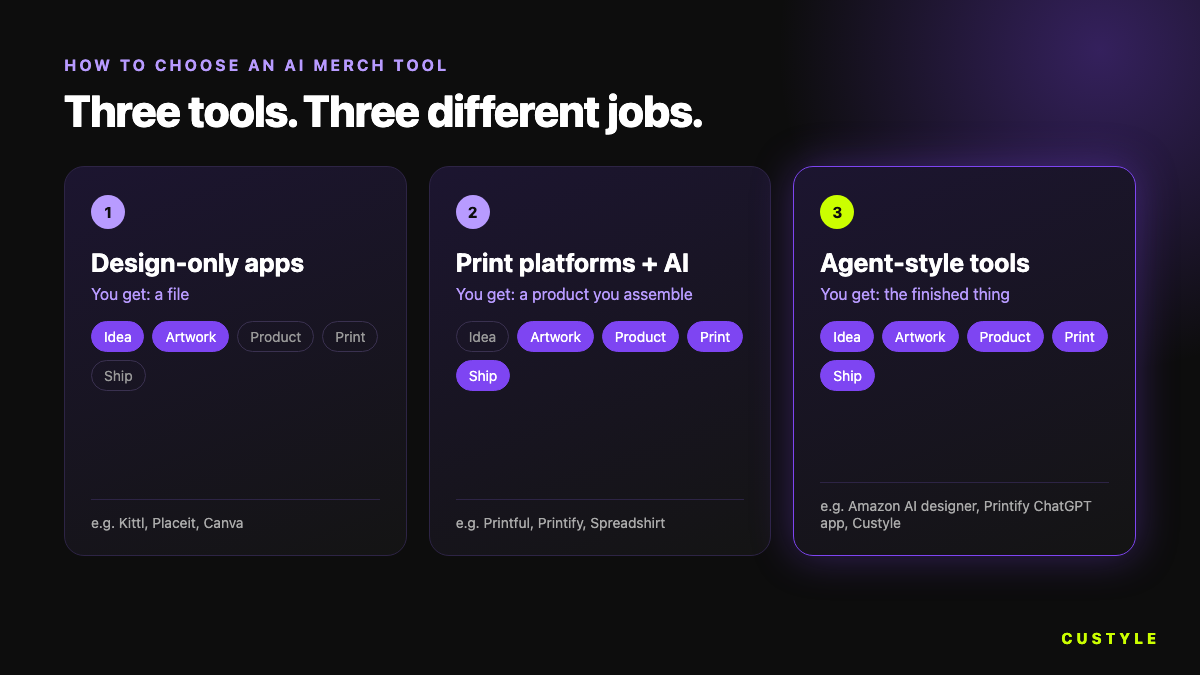
1. Design-only AI apps. Kittl, Placeit and Canva make artwork and mockups. They don't print or ship anything. You export a file and take it somewhere else. Kittl's free plan is for personal use only. Its Pro and Expert plans include a commercial license for up to 500,000 copies, according to Kittl's pricing page.
2. Print platforms with built-in AI generators. Printful, Printify and Spreadshirt let you generate art inside their editors, then produce and ship the item. Printful's Design Maker covers 610 products. Printify gives you 15 free AI image attempts a day. You still drive every step: product, placement, file and order.
3. Agent-style tools. You describe the idea in a chat, and the system handles design, product choice, production and delivery. Amazon launched an AI merch designer inside Alexa for Shopping on June 8, 2026, US-only, per TechCrunch. Printify released a ChatGPT app on May 10, 2026 that puts a design "on the most suitable blank product." Custyle is built around this approach: you start from an idea or image, then review the artwork and product before any order. → Related: What an AI merch agent actually is
One look-alike is worth flagging. Fourthwall's ChatGPT integration manages your store from chat, but Fourthwall says it "doesn't generate new designs." It builds listings from artwork you already have.
No type is better across the board. You trade control for convenience as you move from type 1 to type 3.
Question 1: What Do You Actually Get?
Ask this before anything else: will you get a file, a listing, or a finished product delivered?
- You want a file if you already have a printer, a shop or a print platform you like. A design-only app is fine.
- You want a listing if you're selling to fans and need a storefront. A print platform or creator-store tool fits.
- You want the thing itself if it's a gift, a team order or a one-off drop. An agent-style tool saves you the most steps.
Then check the catalog against your idea. Agent-style tools often carry fewer products than full print platforms. Amazon's tool launched with tees, hoodies, jerseys, tumblers and water bottles. Printful's catalog is wider. If your idea needs a specific item, like a beanie or a phone case, confirm it's offered before you start.
Question 2: Is the File Print-Ready?
This is where most AI merch goes wrong. AI art is often made for screens, not for fabric.
Printful's print-file guide calls 150 DPI "the sweet spot" for apparel. It asks for 300 DPI on small, detailed items like mugs and phone cases. It wants transparent PNG files, so a square background doesn't print around your design.
Now do the math. A 12-inch-wide chest print at 150 DPI needs about 1,800 pixels across. Spreadshirt recommends AI designs of "at least 1000 to a maximum of 4000 pixels per side," and warns that enlarged low-res AI images print blurry. A 1,000-pixel image covers only about 6.7 inches at 150 DPI.
AI upscaling helps, but only so much. In Printful's own example, its AI image tool raised a 60 DPI file to 120 DPI. That's still under the 150 target. Printful treats it as a quick fix for simple designs.
Ask the tool: what pixel size and DPI is the final file at actual print size? Who checks it, the tool or you? A good tool tells you before you pay, or quietly handles it so the result looks sharp.
Want to check a file yourself? Custyle's free print file checker calculates effective resolution and inspects transparency in your browser. It checks file prep only, not rights or printed color.
Question 3: Does It Fit How It's Made?
The same image doesn't work on every product. A photoreal portrait with soft glows looks great printed on a tee. Stitched on a cap, it falls apart.
Embroidery is the clearest example. Printful's graphics and embroidery guide caps standard embroidery at 6 thread colors per design. It warns against thin lines and intricate details. It also says the stitch preview "will always be more accurate than the mockup." Each new embroidery design needs one-time setup, which Printful prices at $2.95 to $6.50.
All-over prints have their own rule. There's no white base layer, so you need to fill the edge area or you'll get white borders.
Ask the tool: does it adapt the design to the product, cutting colors for stitching or extending art to the edges? Or does it drop the same image on everything and leave the fixes to you? This is the gap between art and something made for merch.
Question 4: How Do Revisions Work?
Your first result is rarely your final one. The spelling is off. The dog has five legs. The color is close but not quite your taste.
Check three things:
- Limits. Printify's generator gives 15 free attempts a day. Kittl's Expert plan includes 200 daily tokens, and unused monthly tokens don't roll over.
- Targeted edits. Can you change only the text, the color or the placement? Or does every fix mean starting over?
- Quality checks. Spreadshirt rejects AI designs with spelling errors and "logic errors" like extra fingers. Your tool should catch these before anything prints.
Editing has a second payoff. The US Copyright Office says human "creative arrangements or modifications" of AI output can be protected. A workflow where you shape the result gives you more claim to it than one-shot prompting does. More on that in Question 8.
Question 5: What Does One Item Really Cost?
Ignore the headline price. Ask for the total cost of one item to your door: base product, design fees, shipping and tax.
Here's how the main pricing models compare, from each company's own pages:
| Tool | Model | What to watch |
|---|---|---|
| Printful | Pay per order; free plan or $24.99/month Growth plan | Growth is waived after $12K/year in sales. Shipping and tax are extra. Embroidery setup is $2.95–$6.50 per design. |
| Printify | Pay per order; free plan or $39/month ($299/year) paid plan | Discounts are quoted as "up to 20%" on one Printify page and "up to 33%" on another. |
| Kittl | Free or paid subscription | The free plan has no commercial rights. Paid plans cap copies at 500,000. |
| Amazon AI designer | Free to design; pay for the product | US-only. |
Subscriptions pay off only if you sell enough. For a single gift, a per-item price with no plan is usually cheaper. Also watch for small extras, like Printful's $1-per-item fee for using its paid stock images.
Ask the tool: show me the price at checkout for one shirt shipped to my address. If it can't, keep looking.
Question 6: How Long Until It Arrives?
Two numbers matter here: production time and shipping time. Many tools blur them together.
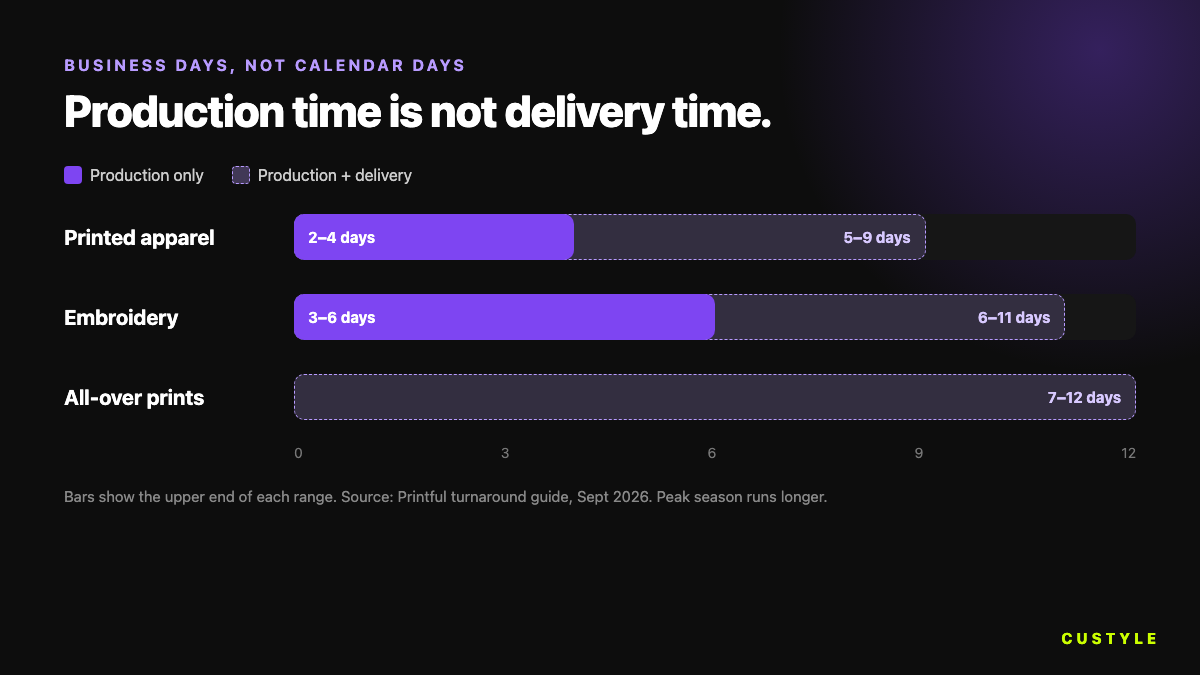
Printful's turnaround guide, dated September 2026, lists production-only times:
- Printed apparel: 2–4 business days
- Embroidery: 3–6 business days
- Screen printing: 5–10 business days
With delivery added, printed tees land in 5–9 business days. Embroidery takes 6–11, and all-over prints take 7–12. Printify says production "typically averages 48 to 72 hours." It also shows each provider's recent average in its catalog.
Peak season stretches all of this. Printify's network status page logged slowdowns last December, with some providers going from 3 to 5 business days. If you're ordering for the holidays, check each carrier's cutoff date on the provider's site, not a blog roundup.
Ask the tool: what's the delivery estimate in business days, to my address, this week? Is that production plus shipping, or production only?
Question 7: What If It Arrives Wrong?
Misprints happen with any print shop. What matters is what happens next.
Printify's Merchant Protection is a useful benchmark. It covers products "printed incorrectly, damaged or in a bad quality." You send photos, and Printify sends a reprint. If the reprint doesn't fix it, you get a full refund.
Note what's usually not covered. Change of mind, or picking the wrong size or color, rarely qualifies on made-to-order items. That's fair, since the item was made for you. But you should know before you order.
Ask the tool:
- How many days do I have to report a problem?
- What proof do you need, and do I have to send the item back?
- Do I get a reprint, a refund, or my choice?
- Is there a real person I can reach?
If the answers aren't written down somewhere, assume the worst.
Question 8: Who Owns It, and Your Photos?
This question gets skipped the most, and it costs the most when it goes wrong.
Copyright. The US Copyright Office's January 29, 2025 report says AI output is protected "only where a human author has determined sufficient expressive elements." Prompts alone don't count. In March 2025, a federal appeals court confirmed that the Copyright Act requires a human author, in Thaler v. Perlmutter. In practice, a design made purely from a prompt may be copyable by anyone. → Related: Who owns an AI-designed t-shirt?
Tool terms. Read the AI terms, not just the marketing page. Printify's AI terms, updated September 2026, are unusually clear. Outputs come "AS IS." You "may not claim any exclusive rights" to them. And "you are responsible for clearing the rights for any Output you use commercially." OpenAI's terms say you own your output, but also that "other users may receive similar output." In other words, your design may not be one of a kind.
Brands and characters. Printify's own guidance puts it plainly: "AI doesn't remove IP responsibility." It warns against prompts for celebrity likenesses, famous characters and living artists' exact styles. Disney and Universal sued Midjourney in June 2025, alleging its tool generated their characters. Those are allegations, not findings. But marketplaces act on IP notices, and Printify says repeated notices can get an account suspended.
Your photos. Pet photos, family pictures and kids' faces are common starting points for merch. Printify's terms say anything you type or upload, including personal data, goes to its third-party AI providers. Whether they train on it "depends on each provider's contract."
Ask the tool:
- Do I own the output, and is it exclusive?
- Is commercial use allowed on my plan, with any copy cap?
- Are my uploads used for training, and can I opt out?
- Can I delete my photos?
- Do my files and licenses survive if I cancel? (Kittl's vector exports don't.)
This is general information, not legal advice.
Red Flags Worth Walking Away From
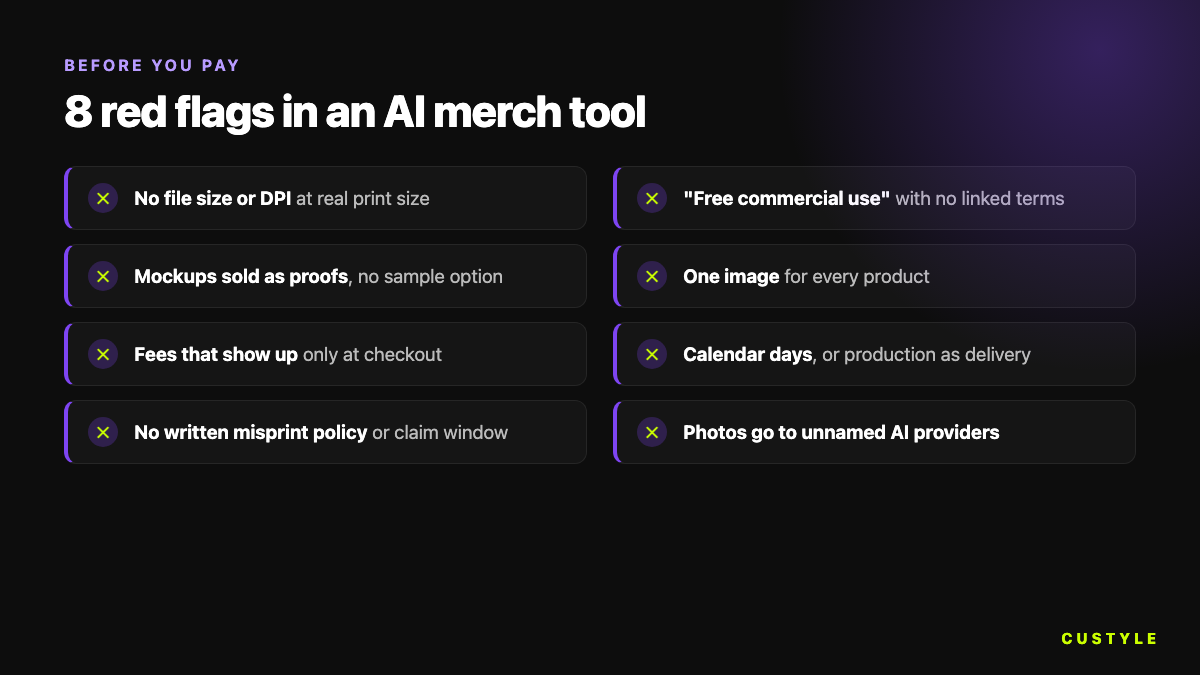
Any one of these is a reason to slow down:
- No stated file size or DPI at real print size.
- "Free commercial use" with no linked terms, or terms that put every rights question on you.
- Commercial rights hidden behind a paid tier you discover at checkout.
- Mockups sold as exact proofs, with no option to order a sample.
- One image for every product, with no changes for stitching or edge-to-edge prints.
- Fees that appear late, like setup, placement or stock-image charges.
- Delivery promises in calendar days, or production time passed off as delivery time.
- No written misprint policy with a claim window.
- "In the style of [famous brand]" prompts that go straight through without a warning.
- Uploads sent to unnamed AI providers, with no delete option.
- No human to contact for revisions, misprints or takedowns.
Run a 20-Minute Test First
Don't commit on a features page. Run the same small brief on two or three tools, and score what you actually see.
- Write one brief. For example: "Line-art of my corgi in a crown, cream tee, small left-chest print, plus the words 'Royal Floof.'"
- Run it on each tool. Note how many tries it takes to get the spelling and the dog right.
- Fix one detail. Change only the text color. See whether the tool edits or starts over.
- Go to checkout. Write down the all-in price and the delivery date in business days.
- Find three pages. Misprint policy, AI terms, privacy policy. Time how long it takes.
- Order one sample from your favorite before you order 30. Printful, for example, allows one sample order a month at a discount.
The tool that wins on steps 2 through 5 is usually the one you'll still like after the box arrives. → Related: AI merch tools compared by job
If you want to try the agent route, Custyle is one option. In Create, you describe the vibe or drop a photo, then review the artwork on a real product before deciding to order. Creation runs on account credits. Ask it the same eight questions.
FAQ
How do I choose an AI merch tool?
Start with the job. Need only artwork? Pick a design app. Need a shop? Pick a print platform. Want a finished product delivered? Pick an agent-style tool. Then check five things: print-ready file size, all-in cost, delivery time in business days, misprint policy, and the AI terms on ownership and photos.
What's the difference between an AI merch agent and an AI design generator?
An AI design generator makes an image, which you then take to a printer or platform yourself. An AI merch agent aims to connect the whole path in one place: understanding the idea, designing it, choosing the product, and moving it toward production and delivery. You should still review the result before you order. Amazon's Alexa designer and Printify's ChatGPT app are recent examples of the agent approach.
What resolution does an AI design need for a t-shirt?
Most print platforms want about 150 DPI at actual print size for apparel. Printful asks for 300 DPI on small, detailed items like mugs. A 12-inch-wide chest print at 150 DPI needs roughly 1,800 pixels across. Spreadshirt recommends AI designs between 1,000 and 4,000 pixels per side.
Can I sell merch with AI-generated designs?
Usually, yes, if the tool's terms allow commercial use on your plan and the design doesn't copy someone else's brand, character or artwork. Purely prompted designs may not be protected by US copyright, so others may be able to copy them. Read the tool's AI terms, and add your own creative edits where you can.
How long does AI-designed merch take to arrive?
It depends on the product and provider. Printful lists 2–4 business days of production for printed apparel and 3–6 for embroidery. Total delivery runs 5–9 business days for printed tees and 6–11 for embroidery. Peak season adds delays, so check holiday cutoffs on the provider's site before you order.
The Right Tool Answers Back
Back to the forty tabs. You don't need the tool with the flashiest demo. You need the one that answers eight questions clearly. What do I get? Is the file print-ready? Does it fit the product? How do revisions work? What's the real cost? When will it arrive? What if it's wrong? Who owns it?
That's how to choose an AI merch tool without regret. Bring your idea, ask the questions, and order a sample first. When you're ready to make it real, start with a vibe → custyle.ai
Ready to make something?
Turn your ideas into real merch with AI. No design skills needed.
Start with a vibeCustyle Picks
Reviews & Comparisons · Nov 24, 2026·15 min read
Further Reading
Explore all →
Who Owns an AI-Designed T-Shirt? Copyright, Trademarks & Merch in the AI Era
A design made purely from a prompt has no US copyright owner. Learn what you can own in AI merch, how trademark differs, and what to check before you sell.
Read more →
From NikeID to AI Agents: A Short History of Mass Customization
Mass customization in four eras: Dell and Levi's built to order, NikeiD added the menu, print on demand made one-offs routine, and AI agents now start from a plain brief.
Read more →
AI Merch Glossary: 40 Terms from Agentic Commerce to Intent-Driven Manufacturing
40 AI merch terms in plain English: agentic commerce, ACP, UCP, MCP, intent-driven manufacturing, DTG, print files and more. One-sentence definitions first, sources linked.
Read more →
What Is Generative Merch? A Working Definition and Examples
Understand AI-generated artwork on physical merchandise, how it relates to POD and custom design, and what dated vendor examples do—and do not—demonstrate.
Read more →